Custom Email
OnTheSnow will send your brand message opt-in email subscribers with this 100% SOV direct response opportunity.
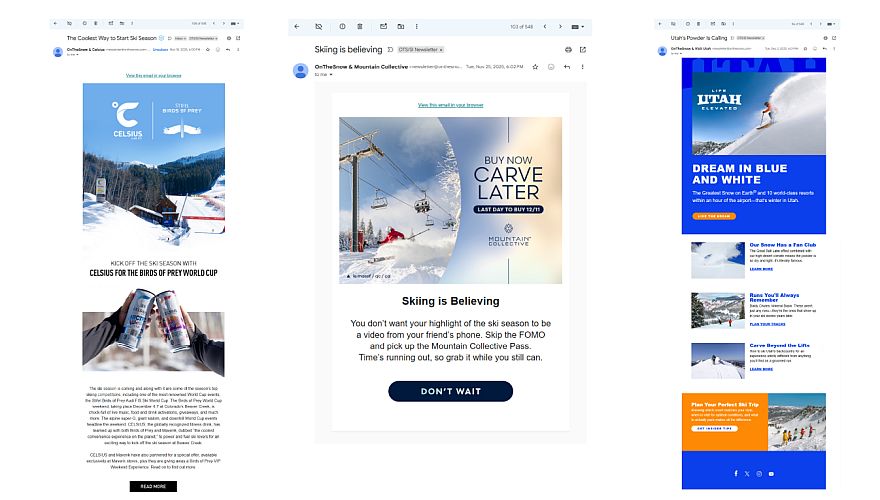
Custom Email
• Subject Line – subject line for your email (no more than 70 characters)
• From Line – The from name for your email, not an email address
• Preview text – text that is shown as preview for some email browsers. (no more than 70 characters)
• HTML version – HTML file with a max width of 600 pixels (size: less than 250k)
• Image: Image should be no more than 70% of your email message for those who do not allow images to load automatically. Any message with 100% image will not be accepted.
• URL Links – 6 links or less in total
• Any CSS styles should be “in-line” (Please DO NOT declare in a style block at top of code)
• Please place all tracking URLS and tracking pixels. Make sure all images have a proper image source link
• Note: only 1 impression tag per email
Subject Line
• Keep it short to maximize the open rate
Preheader
• This is an extension of the subject line to add context and interest
Header
• This is the first thing readers will see when they open your email and is the best opportunity to make an impression about your brand and/or offer
Email Body
• Reader friendliness is key
• Make sure the email is on-brand and simple
• We recommend using sans serif fonts for easy readability and 14pt to 16pt fonts for body copy, and 22pt to 24pt fonts for headers
• Make sure images will be quick to load.
• The color palette of an email is important. Make sure your color choices are harmonious and representative of your brand. If you’re using a background color, make sure the text color and size offer enough contrast.
Call To Action
• CTAs should be short, meaningful and action oriented. We recommend including your CTA twice – once above the fold and once toward the bottom. If you choose to only include it once, above the fold is the best choice for the best CTRs
Do:
• Feature 30% text and 70% visual content (max)
• Include no more than 2 CTAs
• Make sure fonts are easy to read
Don’t:
• Overload with text or images
• Use more than two, or different, CTAs
• Use more than two fonts